
INDYCAR
INDYCARSports
4.22.28K Reviews
- Version
- 18.0.12
- Installs
- 500.00K
- Age Rating
- Everyone
Screenshots
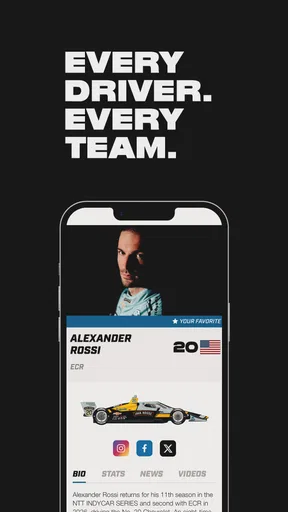
Our Review of INDYCAR
 Analysis by Appyee
I tend to judge sports apps by what happens away from the big race itself. Can I open one quickly while someone else is using the television? Can I hand my phone to another person without worrying about a complicated account mix-up? Does it add useful context, or does it simply repeat information I could find elsewhere? After spending time with the official INDYCAR app, I found that its strongest role is as a focused companion for people who follow the IndyCar Series and want the championship close at hand.
It is a free sports app from INDYCAR, aimed at everyone rather than a narrowly defined age group. That makes it easy to consider for a shared household device, especially when one person follows every session and another only checks in during major race weekends. I would not describe it as a complete replacement for watching a broadcast, though. Its value is in keeping a fan connected between viewing sessions and making quick checks more convenient.
How it works on a shared household device
A realistic example is a family tablet left in the living room. One person may use it for news, another may check sports updates, and a younger fan may want to look at IndyCar information before a race. On that kind of device, this app makes sense because its purpose is immediately clear: it is the official mobile home for the series rather than a general sports portal filled with unrelated leagues.
I like that focused approach. When I open it with a specific IndyCar question in mind, I am not starting from a broad list of sports and trying to locate the right competition. The app belongs to one racing world, so it feels more useful for a household where at least one person already knows what they want to follow.
That same focus can be a limitation. If your household switches constantly between football, basketball, tennis, and motorsport, a broad sports-news app may be more efficient as a single shared destination. The INDYCAR app is better when the goal is depth of attention toward this particular series, not when everyone wants one universal sports dashboard.
There is also a practical shared-device habit I recommend: use the app for quick checks before opening a full television stream or searching the web. A fan can confirm what is happening, review the available race information, and then decide whether it is worth moving to a larger screen. This reduces the familiar problem of opening several browser tabs while another person is waiting to use the device.
The best household use is coordination, not account sharing. One person can keep the app available for race-related checks while other family members use separate services for their own interests. I would avoid treating a shared tablet as though it were a personal profile unless the app’s current behavior clearly supports that arrangement. Keeping expectations simple prevents confusion when different people use the same screen at different times.
What the first setup tells you
The application has been available since August 19, 2010, so it is not a new experiment built around a temporary racing trend. Its current version is 18.0.12, and it runs on Android 8.0 or later. For an older household phone or tablet, that operating-system requirement is the first practical checkpoint. If the device is below that level, I would look for a newer device rather than assume the app will work there.
On a compatible device, I would install it with a clear purpose: following the series, checking race-related information, and keeping up with the official IndyCar environment. I would not install it expecting a general-purpose motorsport encyclopedia or a substitute for every live viewing option. That distinction matters because it shapes whether the app feels focused or limited.
The free price also makes testing straightforward. There is no purchase decision to make before discovering whether the app suits your household’s habits. I would still approach “free” realistically: the absence of a price does not guarantee that every desired piece of race coverage will be available in the exact form a viewer wants. The app should be judged as an official companion, not automatically as a complete broadcast service.
For shared use, I would establish a simple boundary from the start. Decide whether the device is being used for casual browsing or whether one dedicated user will regularly manage race information. If several people take turns, close the app when finished and return the device to its normal household routine. That sounds basic, but it avoids one person leaving a screen in a confusing place for the next user.
I also recommend checking the device’s normal notification and privacy habits before handing it to a child. I am not suggesting that this app provides special family controls; rather, a shared device has its own settings, and those settings should be understood separately from the app. A sports app can be age-appropriate while the wider device still contains personal messages, accounts, or unrelated content.
Keeping different fans coordinated
IndyCar viewing often works better when people coordinate around a race weekend instead of all trying to follow the same information at the same moment. One household member may watch live, another may catch up later, and a third may only want a quick update. The app is useful in that situation because it gives the dedicated fan a central place to return to between conversations and viewing sessions.
My preferred workflow is to use it as a reference point before the event, a companion during breaks, and a way to reconnect with the series afterward. I would not rely on a shared device as the only source of information if several people need simultaneous access. In that case, individual phones are less awkward, while the household tablet can remain a convenient secondary screen.
A non-obvious benefit of the official focus is conversational clarity. When a family member says they want to check IndyCar, there is less ambiguity about which competition or league they mean. That is especially helpful in a home where several sports apps are installed and each person has different interests. The app’s narrow identity becomes an advantage rather than a weakness.
There is a trade-off, however. A general sports app may be better for comparing IndyCar with other racing series or following several competitions in one place. The official app is the more natural choice when the conversation is specifically about IndyCar. I would choose based on that boundary rather than installing it simply because it is official.
Another useful household routine is to separate “checking” from “watching.” Use the app to answer a quick question without interrupting a broadcast, then return to the larger screen for the actual race experience. This keeps the phone or tablet from becoming a distraction and makes the app serve a supporting role. For a serious fan, that small distinction can make the application feel much more valuable.
Age context and trust on a family device
The content rating is Everyone, which makes the app easier to consider for a family-owned device. I would still apply ordinary supervision for younger users, not because the rating creates a special concern, but because shared technology always involves more than the individual app. A child may be comfortable exploring race information while an adult remains responsible for the device, its accounts, and its wider content.
For older children and teenagers who already follow motorsport, the app can be a good way to encourage independent interest. They can use it as a dedicated IndyCar reference instead of relying on scattered searches. I would explain that an official app is useful for series-specific information, but it is not necessarily the same thing as live television, a full video platform, or a broad news service.
Trust also means being clear about whose device is being used. If the app is installed on a parent’s phone, I would not assume that everyone should freely change settings or use the device for extended periods. On a family tablet, the arrangement is simpler, but the same principle applies: the app can be shared as a viewing companion without turning personal accounts or private device content into communal property.
The Everyone rating is reassuring for basic household access, yet it should not be confused with a promise that every family member will enjoy the experience. A child who wants interactive games may find a dedicated racing game more engaging. A parent who only wants occasional results may prefer a quick search. The app is most appropriate for someone who values the official IndyCar context itself.
Where it stands beside ordinary alternatives
The usual alternatives fall into three groups: a general sports-news app, a web browser, and a live broadcast or streaming service. Each one solves a different problem. A sports-news app is broader, a browser is flexible, and a broadcast is better for watching the race unfold. The INDYCAR app earns its place by offering a more concentrated route into the series.
Compared with a browser, the dedicated app should feel less like starting from scratch. You are not building a search query every time you want IndyCar material. That convenience matters most to regular followers. For an occasional viewer who only searches for the series a few times a year, the browser may be perfectly adequate and may avoid adding another app to the device.
Compared with a broad sports application, the official option has a clearer identity. I would choose it for a fan who wants the IndyCar Series to have its own space on the phone. I would choose the broader alternative for a household where everyone wants different sports and nobody wants to move between several specialized apps.
Compared with a broadcast service, the roles are not interchangeable. The app can support the viewing experience, but it should not be selected on the assumption that it replaces the screen where you watch the race. If your main question is “Can I watch every moment here?”, this is the wrong decision criterion. If your question is “Can I stay connected to IndyCar when I am away from the television?”, it becomes much more compelling.
What regular users should know before committing
The app’s audience is already visible in its numbers: it has an average rating of 4.2 from around 9.3 thousand ratings, with roughly 2.3 thousand written reviews and over 500 thousand installs. I read that as evidence of an established audience, not as a guarantee that every user will have the same experience. A high level of adoption can tell you that the app is relevant to many fans, while individual preferences still determine whether its focus feels useful.
For me, the most important decision is frequency of use. If you follow IndyCar throughout the season, a dedicated official app is easier to justify than if you only tune in for one event. Regular users benefit from having a familiar place for the series rather than repeatedly searching the open web. Occasional users may prefer the lighter commitment of a browser or their existing sports app.
I would also consider the device itself. On a personal phone, the app is convenient for a committed fan who wants the series close by. On a household tablet, it becomes a shared reference screen, but it should not be mistaken for a multi-user coordination platform. That distinction is important because the app’s sports purpose and the device’s household purpose are not necessarily the same thing.
Another trade-off is attention. A dedicated racing app can make it easier to stay engaged, but it can also encourage repeated checking when you would rather be present with the people around you. I find it works best when I open it with a question or a specific reason, then put the phone down. Used that way, it supports the race instead of competing with it.
My household verdict
I recommend INDYCAR to a household with at least one genuine IndyCar follower, especially when that person wants an official, focused companion rather than a general sports feed. The free access and Everyone rating lower the barrier to trying it, while support for Android 8.0 or later makes the technical requirement clear for older devices.
I would skip it if your household wants one app for every sport, if you only need occasional search results, or if your primary expectation is a complete live viewing service. In those cases, a broad sports app, browser, or broadcast platform may fit better. The official app is not automatically the best tool simply because it carries the series name.
For shared use, my recommendation is to keep the boundaries practical: treat it as an IndyCar reference and race companion, use personal devices when several people need access at once, and remember that the Everyone rating does not replace normal family supervision of the wider device. With those expectations, the app feels purposeful rather than overpromised.
After weighing its focused identity against the limits of a specialized sports app, I see it as a sensible installation for regular IndyCar fans and a useful addition to a shared household tablet. It does not need to replace television, streaming, or general sports news to succeed. Its job is narrower: keep the IndyCar world within easy reach, and in that role, I think it does enough to earn a place on the right fan’s device.
Verdict
Strengths of INDYCAR
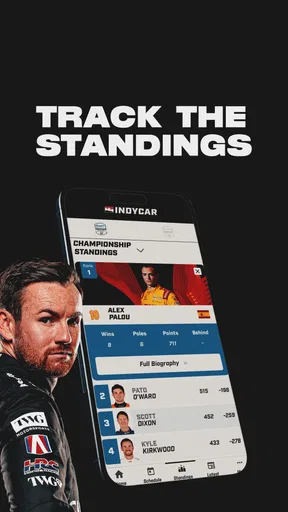
- Official schedules, results, standings, and race information in one place.
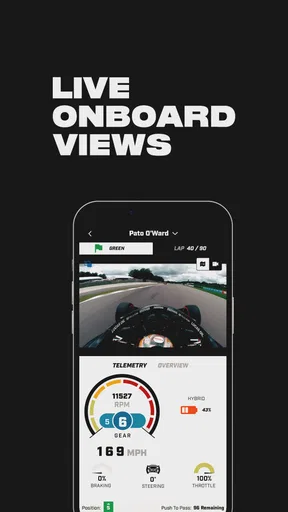
- Live timing helps fans follow lap times, positions, and race progress.
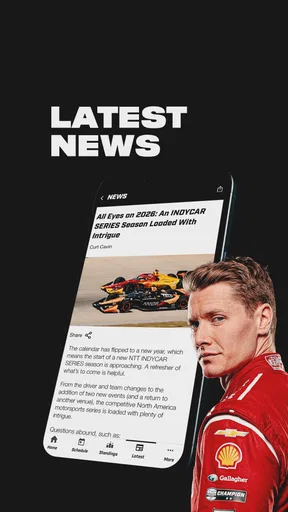
- News and video content provide regular updates from the INDYCAR series.
- Useful for tracking multiple drivers and teams throughout the season.
- Free to download and available for both Android and iOS devices.
Limitations of INDYCAR
- Some live features may require a reliable internet connection.
- Notifications can become frequent during race weekends.
- Coverage and features may vary depending on your location.
- The interface can feel crowded when many race updates appear together.
- Video availability may be limited by broadcast rights or region.
Similar Picks in This Category
View All
BeSoccer: Soccer Live Score
BeSoccer apps4.3

Cricbuzz - Live Cricket Scores
Cricbuzz.com3.7

NFL
NFL Enterprises LLC2.4

Da Fit
MO YOUNG LIMITED3.6

ESPN
Disney4.5

LiveScore: Live Sports Scores
LiveScore Limited4.5
Frequently Asked Questions
What is the INDYCAR app used for?
The INDYCAR app is designed for fans who want to follow the NTT INDYCAR SERIES from a mobile device. It typically provides race schedules, results, standings, news, driver and team information, videos, and other championship updates. The exact features may vary by season and region, so users should check the current app description before downloading.
Can I watch live INDYCAR races through the app?
The app may offer live timing, race updates, highlights, interviews, and selected video content, but it should not automatically be assumed that every race can be streamed live inside the application. Live video availability depends on broadcasting rights, your country, and your television or streaming provider. Check the event page and regional availability before relying on it for live coverage.
Does the INDYCAR app provide live timing and race results?
Yes, one of the most useful reasons to install the INDYCAR app is to follow sessions while they are happening. Depending on the event and current version, you may find live timing, leaderboard information, qualifying results, race results, lap updates, standings, and alerts. Some detailed timing features can require an internet connection and may change during major events.
Is the INDYCAR app free to download and use?
The official INDYCAR app is generally available as a free download, allowing fans to access basic championship news, schedules, results, and other information without an upfront purchase. However, mobile data charges may apply when using video or live updates, and certain content may depend on external broadcasters or services. Review the store listing for current in-app purchase details.
What permissions and device requirements does the INDYCAR app have?
Before installing, make sure your Android or iOS device uses a supported operating system and has sufficient storage space. The app may request internet access, notifications, and other permissions needed for alerts, videos, or personalized features. Notifications are particularly useful for race starts and breaking news, but they can be disabled in your device settings if you prefer fewer interruptions.
